What can AM do for you?

Avant Manager is a management software specialized solely and exclusively in Architecture and Engineering firms. We want you to save time and money from the very first minute. How? By delegating administrative and routine tasks to a system that will do the work for you, quickly, efficiently, and error-free.
A cloud-based software that won’t require you to change anything in your IT system and is paid for monthly, with no initial investment and no commitment. With Avant Manager, you’ll increase your team’s productive capacity without having to pay more salaries.
COMMERCIAL MANAGEMENT

Make complex and detailed queries directly to AMI (Avant Manager Intelligence), Avant Manager’s artificial intelligence. AMI intelligently queries Avant Manager’s database and provides you with specific answers to the questions you ask.
With Avant Manager’s CRM tool for client management, you can easily view sales actions taken, new clients acquired, upcoming actions, and more. You’ll have all companies classified according to their acquisition or loyalty status with our firm, contact people, notifications for upcoming actions, and more. In addition, you’ll have all your Avant Manager contacts synchronized with your mobile phone’s address book.
With the supplier management tools, you can easily view and classify your suppliers, as well as access all the information on the invoices they’ve issued to you, the subcontracts you’ve entered into with them, and their respective purchase orders.
With the CRM Pipeline tool, you can visually view all the stages a sales opportunity goes through until it becomes a contracted project. You can also forecast potential future revenue based on the acquisition probabilities you assign to each lead, project, and offer.
Avant Manager includes a tool that will help you comply with the General Data Protection Regulation. Every time you add a new contact to Avant Manager, the system will ask you if you want to send them a request for consent to process personal data via email, using a template you’ve previously prepared. When your client receives your request, they’ll simply click the Accept or Decline button. If they accept, their consent will be recorded in your database. If they decline, the system will delete their personal data from your database to ensure you don’t violate regulations. Additionally, the system will monitor pending responses, so you can send a reminder notice whenever appropriate.
With this tool, you can connect your corporate website to your Avant Manager database, ensuring your company’s website always displays up-to-date information about the projects you’ve completed (such as photos, descriptions, and other information) without having to frequently invest time in your website to keep it updated.
Mailchimp is a widely used online tool for sending communications and newsletters to contacts in your databases. With synchronization with the MailChimp service, when we add a new company to Avant Manager and associate a series of contacts with it, these contacts can be added with a simple click to the distribution list we select in MailChimp without even having to log in. This allows us to keep our Mailchimp database constantly updated and organized so we can send commercial newsletters and other communications to whomever we want.
With this feature, you can allow your clients to access part of the documentation for the project you’re developing for them. You define which sections and information they can view. The project gains transparency, and you save time serving your clients.

TECHNICAL MANAGEMENT

Make complex and detailed queries directly to AMI (Avant Manager Intelligence), Avant Manager’s artificial intelligence. AMI intelligently queries the Avant Manager database and provides you with specific answers to your questions.
Avant Manager offers a very easy-to-use tool that groups, organizes, and details all information related to project management: economic proposals, contracted work, subcontracts, invoices issued and received, expense reports, assigned team, emails, project group chat, time spent, costs and margins, historical records of actions performed, task assignments, photos, scheduling, documents, and more.
Avant Manager goes one step further to facilitate the storage and organization of our projects by connecting the program to your company’s Dropbox, OneDrive, or SharePoint account. Dropbox, OneDrive, or SharePoint become the interface between your local server and our cloud management software.
Thanks to the connection to Dropbox, OneDrive, and SharePoint, every time the user creates a new project in Avant Manager, the corresponding folder is automatically created on the server, as well as all previously defined subfolders and templates. Emails will be automatically saved in their corresponding project; you can automatically select documentation to attach to an email; all economic proposals, invoices, subcontracts, orders, photos taken from the app, etc. will be automatically stored in the corresponding folders on your server.
You can easily monitor the time each professional has spent on a specific project, ensuring that the hours dedicated correspond to the projected deadlines and billing, and knowing the cost of each project in time and money. Each professional on the team can easily record—from the office or from their mobile phone—the time they spend on each project task.
Recording employee work hours is mandatory. Avant Manager includes a tool that allows your team of professionals to easily clock in and out of the workday from anywhere, allowing you to monitor hours to be compensated, overtime, and more.
Our management software for architecture and engineering firms also includes a space for interaction and coordination with the team. An internal news feed, task management, process management, and a chat application, for example, allow us to stay permanently connected to streamline coordination with other professionals, optimize time and dedication, and guarantee the best results for our clients.
Proper time management is vital to the efficiency of your practice. With Avant Manager, you can define start and end dates for each task in each project and analyze the workload at any given time using Gantt charts, Kanban tables, and Lean Plans. You can also define deadlines and maximum time to be spent on each of a project’s subtasks.
With the Lean Plan tool, you can manage your firm’s weekly task planning, easily viewing each team member’s workload for each day and making changes to the schedule in real time.
A tool for team coordination through a digital board that can be accessed from anywhere. Kanban boards are an effective way for each team member to understand what activities they need to complete at any given time and what their priority is. They also display actions in progress, those on hold, and those that have already been completed. Save time and increase your team’s effectiveness.
To work efficiently and at an appropriate pace, it’s necessary to organize the different tasks in your architectural or engineering firm’s projects to avoid periods with excessive workloads or periods with poor task planning. With Gantt charts, you can view the tasks you’ve been contracted for for each project and generate a visual and intuitive graph that allows you to analyze whether the tasks are correctly distributed over time, as well as monitor the progress of each one.
With Avant Manager, you can improve your team’s coordination: you can assign tasks to other professionals, they can assign them to you, you can set due dates, link tasks to a specific project or email, open conversation threads… In short, you improve your team’s communication and efficiency.
The process management tool helps you manage specific processes that require specific monitoring, such as building permit applications, visa management, government requirements, inspections by regulatory bodies, etc.
When you create a project in Avant Manager and enter its address, the system geolocates it and, through its link to the Virtual Cadastre Office (Spain), allows you to quickly and easily obtain the cadastral reference of the plot and all the references of the private units it contains.
In engineering and architecture firms, it’s common to prepare customized project portfolios to present to a specific client or bid. Avant Manager can generate project lists filtered by any imaginable parameter in a matter of seconds and create a PDF document with a cover page featuring our firm’s corporate image, an introduction, and a list of projects and images we’d like to include in the portfolio. Additionally, with just one click, we can choose the language in which we prepare the documentation because AM is multilingual and multi-company.

FINANCIAL MANAGEMENT

Make complex and detailed queries directly to AMI (Avant Manager Intelligence), Avant Manager’s artificial intelligence. AMI intelligently queries the Avant Manager database and provides you with specific answers to your questions.
Avant Manager allows us to control the figures and data for each project. We have real-time access to detailed costs, profit margins, production, and billing: contracted fees for each project, expenses derived from hours invested, other expenses and associated receipts, invoices received, subcontracts, orders, and more.
Financial Manager helps us maintain financial control of the firm. At any time, we’ll have up-to-date financial information on all our current contracted projects: total fees, subcontracted amounts, amounts generated, invoiced, and outstanding, invoices issued and outstanding, client information, and more. Financial Manager also offers a monthly financial analysis of recent months, with the amounts offered, contracted, subcontracted, generated, and invoiced, as well as balance sheets and a cash flow forecast for the next 12 months.
In the engineering and architecture field, specific and detailed financial information is essential. Avant Manager generates various reports (annual, production, client, and project reports) with the performance of managers—which projects they’ve led, fees, clients, amounts, team managed, and so on; with all the jobs offered and projects invoiced; with client profiles—which projects they’ve contracted, fees, invoices, and so on; and with the costs of the projects we’ve been working on.
With your pre-configured templates, you can generate economic proposals almost automatically. Enter the project details, select the jobs to be quoted and the general terms and conditions, choose the recipient, and Avant Manager will automatically generate an email addressed to your client, with a personalized text in your client’s language, and with the complete proposal attached in PDF format.
Avant Manager allows us to easily manage and control subcontracts. For each project, we can quickly consult the list of subcontracts, the financial proposals submitted to us, the total subcontracted amount, invoiced amounts, and amounts pending to be invoiced. Each new invoice sent to us by our supplier simply needs to be registered so that it is incorporated and accounted for in the project. In addition, for each project, we can see the amount we have subcontracted and the percentage it represents of the total to be invoiced.
Avant Manager offers the ability to generate electronic invoices using the Facturae format.
In addition to generating electronic invoices, Avant Manager also has the ability to submit them electronically to the FACe portal of the General State Administration (Spain).
Avant Manager is certified as a SIF (Invoicing Information System), which means it can issue invoices adapted to the Veri*factu system.
With Avant Manager, creating and sending an invoice takes just a few seconds. Our management software selects the client’s information, invoice number, and date, shows us what we have pending to be invoiced, automatically writes the invoice text once we have selected the items, creates a PDF document, and attaches it to an email addressed to our client, with a customized subject and text. It also notifies us of receipt confirmation from the client.
Recording of invoices received from suppliers, or for other services or consumption, with AI recognition of invoice data fields. All documentation is organized, archived, and linked to the corresponding project.
Automatic generation of purchase orders for suppliers based on templates customized to the format and terms of your architecture or engineering firm.
A digital space that you share with your suppliers so that recording their invoices is faster and more secure than traditional emails. Furthermore, the system initially checks the submitted invoice and, if errors are detected, prevents it from being recorded on the portal, avoiding incorrect documents and saving administrative staff time.
The amount of the invoices we issue is not synonymous with actual production and its associated profits. Avant Manager offers a very fast and intuitive tool that allows you to know the firm’s actual monthly production, regardless of whether we invoiced more or less and whether we spent more or fewer hours. It is an application with a list of all the projects worked on each month, the hours invested in them, as well as the percentage completed for each job, allowing us to know the specific amount actually produced each month.
Record taxi, parking, and toll tickets very quickly and with the option of automatically uploading photos from your smartphone, as well as with AI recognition of the ticket data fields. The expense is linked to the corresponding project. An eco-friendly and convenient alternative to traditional paper receipts.
Bank integration allows you to check your company’s bank accounts directly from Avant Manager, allowing you to more quickly see what payments have been received and associate them directly with their corresponding invoices, registering them as “Collected.”
Integration with the AEAT (State Tax Administration Agency (Spain)) allows, among other features, to verify the validity of the NIF/CIF (Tax Identification Number) of the companies and individuals, clients, or suppliers we register in our database.

AI (Artificial Intelligence)

AMI (Avant Manager Intelligence) is Avant Manager’s artificial intelligence and helps you manage your practice more efficiently.
It offers you the ability to perform complex and customized queries on the Avant Manager database and obtain detailed answers, data analysis, comparison tables, and more. It also helps you with tasks such as recording an incoming invoice or expense report, applying AI to recognize the data in these documents and automatically filling in the corresponding fields so you can record them in Avant Manager. It also helps you automatically classify the emails you receive, the photos you take from the mobile app, and so on…

EMAIL MANAGEMENT

With the initial templates you create, Avant Manager is able to generate and send emails automatically but in a personalized way. You can send invoices, economic proposals and more, automatically, saving time and maintaining the personal contact with your client. In addition, emails are automatically classified and linked to the corresponding project and client. You can search for emails by project, client, person, type, etc., and share them with your team without having to forward them. You can do away with applications like Outlook or WeTransfer because with Avant Manager, you’ll have greater capacity to manage your emails efficiently, intelligently, and automatically.

CALENDAR

With the Avant Manager calendar, you can share appointments with your team, coordinate with them, see upcoming sales actions, when you need to issue the next project invoice, or when to check if issued invoices have been collected. You can set work schedules, as well as manage the request and acceptance of vacation days, absence days, remote work days, etc. You can also manage the calendar and reservations for shared resources in your studio, such as meeting rooms, vehicles, equipment, etc. Your Avant Manager calendar will also be synchronized with your mobile phone. Forget the limitations of traditional calendars like Outlook or Google Calendar!

MOBILE APP

With our app, you’ll have your studio in your pocket: upload project photos directly to its folder, geolocated and with text and audio comments; record expense reports and link them to the corresponding project with AI data recognition; track the time you spend on each task and the work you do; view pending tasks and coordinate with your team; check project emails and their attachments; communicate via chat; view your calendar; manage your business activity; view information in your database; record your work schedule, absences, or remote work days… all with just one click.

MESSAGING

Avant Manager has a quick messaging system that allows you to communicate via chat with other team members, both from the website and from the app.
The system offers individual chats for speaking with a specific person, project group chats for speaking with all specific members linked to a project, and Rooms (chats that the user can customize with the desired people in each group).

AVANT TV

Avant Manager allows you to display various office information that may be of interest to the team and help them better organize their tasks on one or more TV monitors installed in a central location, visible to all employees—or even to visitors.
We can project data such as compliance with billing and monthly production goals, weekly planning, the best clients of recent months, ongoing projects, monthly production achieved, professionals out of the office, weekly planning, etc.

Multi

Avant Manager is multilingual, both in its user interface and in all the documents it generates, including economic proposals, invoices, orders, portfolios, emails, etc.
It’s also multi-country, multi-timezone, multi-currency, and multi-company, so you can use it in any environment where your own team, clients, or suppliers are of different nationalities, or if your organization operates from different companies, different countries, or with different currencies or languages.

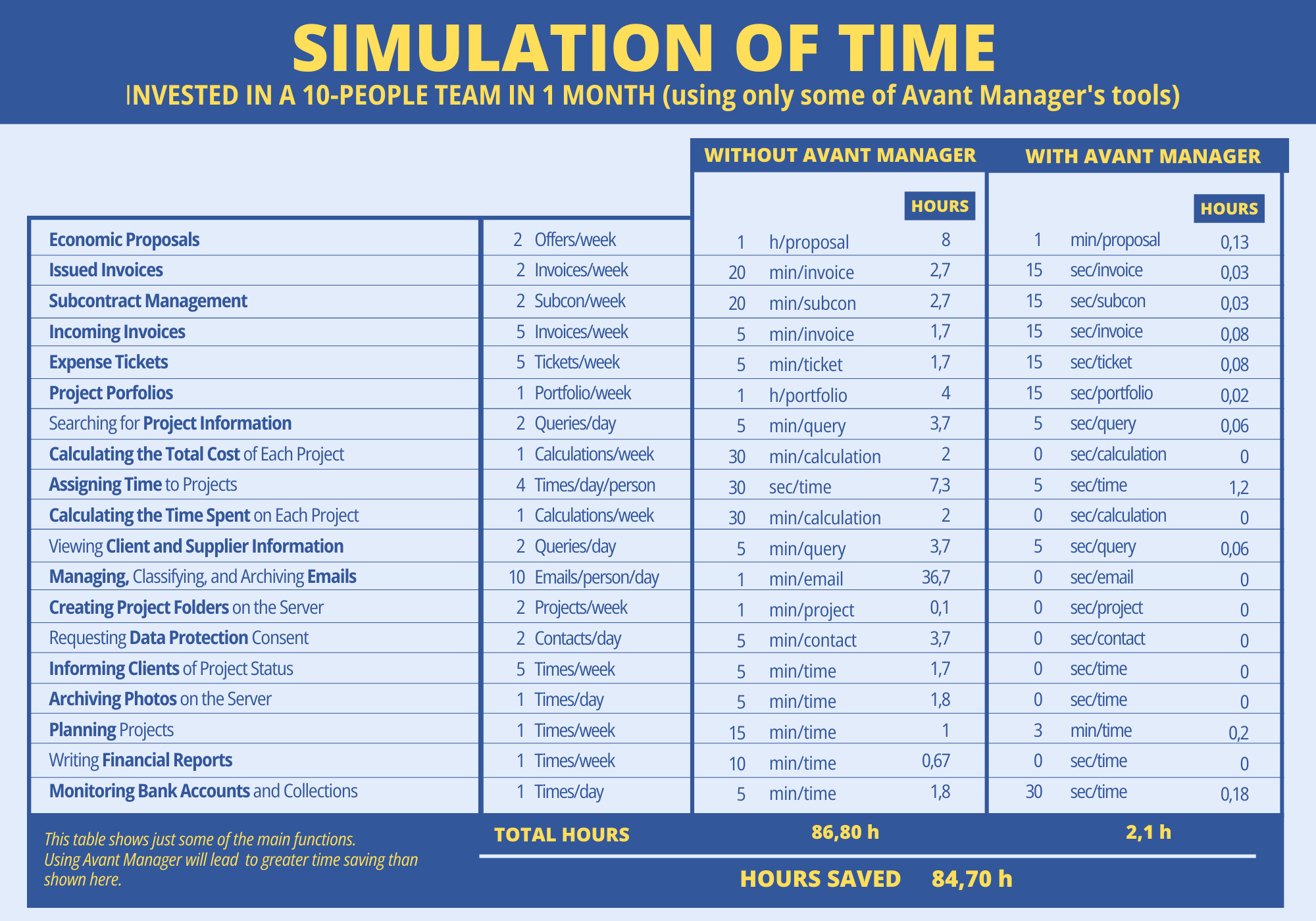
DO YOU WANT TO KNOW HOW MUCH TIME YOU CAN SAVE IN YOUR STUDIO USING AVANT MANAGER?